AI Assistant Apps Compared: General Chatbots, Device Assistants and Planner Assistants
Key answer AI assistant apps fall into three groups: general chatbots that answer almost anything (ChatGPT, Gemini, Claude), device assistants tied to your phone’s own apps (Siri), and planner assistants that turn what you say into tasks and calendar events (Aria). If you only need answers, a chatbot is enough. If what you say has to end up as a reminder and a calendar event, a planner assistant fits better. Before you start, check where your history is kept.
This guide was written by LIPSON, the maker of Aria. Details about other apps come from their US App Store listings (descriptions, price and supported devices) and each company’s official pages as of , and may change with updates. It is a guide to help you choose, not a ranking.
What kinds of AI assistant apps are there?
| Type | Good at | What to check | Examples | Where your history lives |
|---|---|---|---|---|
| General AI chatbot | Explaining, writing, searching, sorting out ideas | Whether the tasks it organizes reach reminders and your calendar | ChatGPT, Gemini, Claude | That service’s chat history |
| Device assistant | Jobs close to calls, messages and built-in apps | Which features depend on device, carrier or language | Siri | Built-in apps (Reminders, Calendar) or that service |
| Task and calendar assistant | Turning what you say into tasks, events and reminders; organizing your day | General questions count against a daily limit | Aria | The app’s task and event records, plus your device calendar |
The lines are not sharp. For example, the Google Gemini App Store description says you can connect Google apps such as Gmail and Calendar, and the ChatGPT and Claude apps are described as general-purpose assistants for writing, research and problem solving. Check each app’s current description for what it can connect to.
What should you check if you plan your day with a general chatbot?
Chatbots are strong at drafting plans and tidying lists. How they connect to reminders and your calendar depends on the service and the plan, and it changes often. Try these three things in the app you use:
- Say “remind me at 9 a.m. tomorrow.” Does your iPhone actually alert you?
- Does the schedule it built land in your iPhone calendar, or only stay in the chat window?
- A few days later, can you pull up just “this week’s to-dos” as a list?
What does a planner assistant do for you?
Take Aria as an example. One sentence like “Report due Friday, team meeting tomorrow at 3 p.m.” becomes one task and one event, with reminders set. In the morning, a briefing points out today’s events and what to do first; in the evening, one tap on Reschedule all moves what is left. Aria can also find dates in photos and screenshots and suggest events, and it can transcribe a meeting or lecture recording into a summary and to-dos (recording summaries). Get consent from everyone present before you record, and check your school or company rules first.
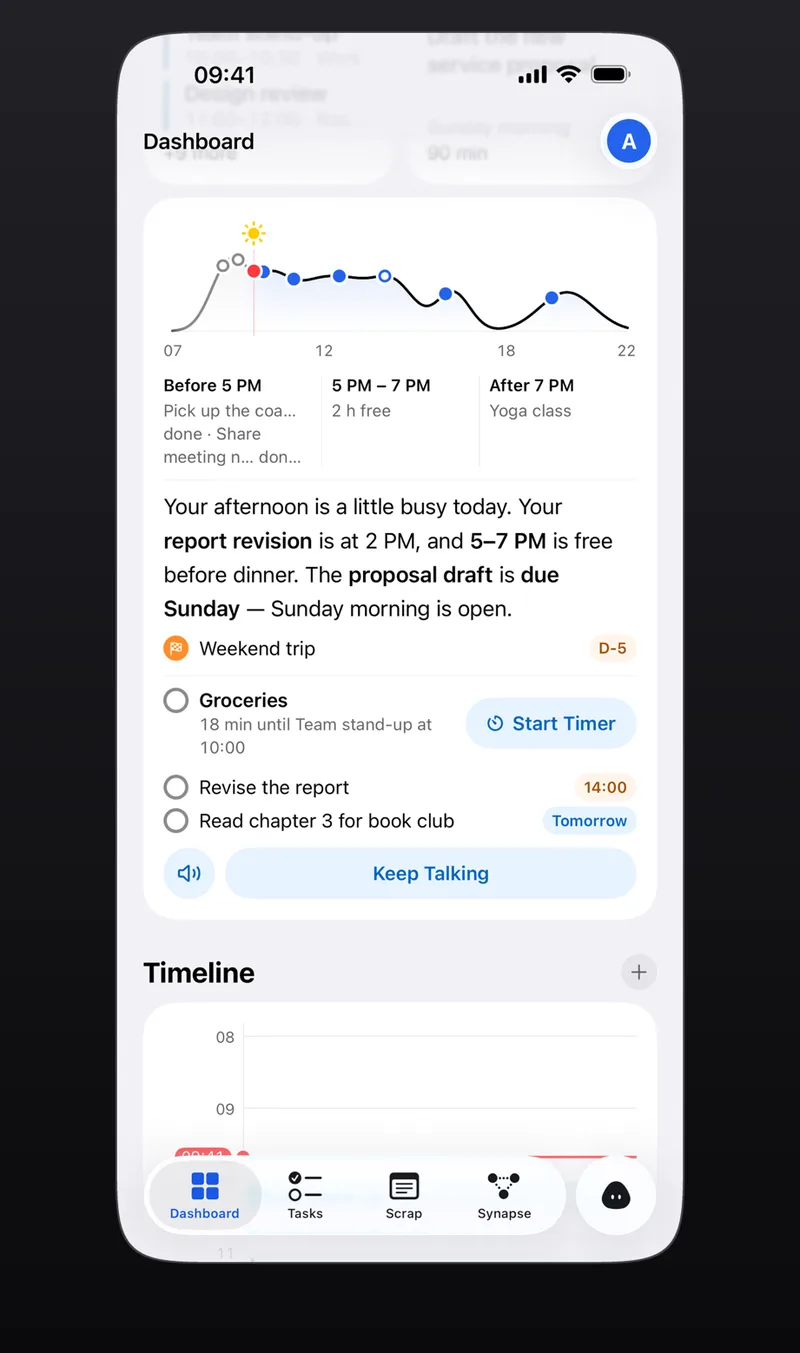
For questions that need current information, Aria searches the web and answers with sources; a task’s Look it up button works the same way. The full flow is in AI scheduling assistant.
Where do your records go?
Whichever AI assistant you use, check these five things first. The right-hand column is Aria’s answer.
| What to check | In Aria |
|---|---|
| Is my chat used to train AI models? | No. Aria and its AI providers do not use your data to train AI models. |
| Can I see and delete what the AI remembers? | Yes, in Settings → AI → Memory. |
| Is there a menu to delete my account and data? | Settings → Account → Delete account (guests: Delete all my data). |
| Where do photos and recordings go? | The app first explains what is sent where and asks for your consent, then sends only what the request needs over an encrypted connection. |
| Can I use it without signing in? | Yes. Start as a guest and your records are tied to that device. |
For any other service, look for the same items in its privacy policy and settings. Aria’s details are in the AI Notice.
How much can you use for free?
As of October 2026, every example app here is free to download from the US App Store, and most offer paid plans for higher limits or extra features. In Aria, every non-AI feature is free, and you get 20 AI questions a day plus 3 web searches or Look it up requests a day at no cost. Aria Pro raises AI requests to 200 a day (a daily fair-use limit applies).
Frequently asked questions
Is there a free AI assistant app?
Yes. ChatGPT, Gemini, Claude and Aria are all free to download from the US App Store (checked October 17, 2026). What the free tier covers differs by service, and heavy use may need a paid plan. In Aria, 20 AI questions a day are free.
Does an AI assistant use my chats for training?
It depends on the service, so check each privacy policy and settings screen. Aria and its AI providers do not use your data to train AI models (see the FAQ).
How is Siri different from an AI assistant app?
Siri is the assistant built into iPhone, so it connects directly to built-in apps such as Reminders, Calendar and Phone. An app like Aria goes deeper on organizing tasks and events, and you can also call it from Siri and Shortcuts.
iPhone · iPad · Mac · Apple Watch · iOS 26.0 or later · English · Korean