Best To-Do List Apps for iPhone: 6 Free Options Compared by Device and Purpose
Key answer If you only use Apple devices and want something light, start with the built-in Reminders app. If you also use a Windows PC or an Android phone, choose a cross-platform app such as Microsoft To Do, Google Tasks, Todoist or TickTick. If you want one spoken sentence split into tasks and events, look at an AI assistant app like Aria. Start by checking your devices, the free tier and how you add tasks.
Written by LIPSON, the maker of Aria. Information about other apps comes from US App Store listings (description, price, supported devices) and each company's official pages as of , and can change with app updates. This guide helps you choose; it is not a ranking.
What should I look at when choosing a to-do app?
Answer four questions about your own situation first. Once you do, the candidates narrow to two or three.
- Which devices do you use? Whether you use only an iPhone, have a Windows PC at work, or a family member on Android changes the candidates.
- How much is free? Even when the download is free, many apps put features such as calendar views or the number of reminders behind a subscription.
- How do you add tasks? Decide whether you will type one at a time, talk to Siri, or mix several things into one sentence.
- Where do you look at them? Choose what you cannot do without: a Home Screen widget, Apple Watch, or the same screen as your calendar.
How do they compare at a glance?
| App | Price to download | Apple Watch | Beyond iPhone | Highlights from the listing |
|---|---|---|---|---|
| Reminders (Apple) | Free · built in | Yes | Apple devices (iCloud) | Smart lists and tags, Groceries list auto-grouping, add with Siri |
| Microsoft To Do | Free | Yes | Windows and Android apps | Sync with Outlook tasks, shared lists, recurring due dates |
| Google Tasks | Free | Not listed | Android app, Gmail and Google Calendar on the web | Create a task from a Gmail message, subtasks |
| Todoist | Free (paid plans available) | Yes | Android app, browser | Natural-language Quick Add, location-based reminders |
| TickTick | Free (Premium subscription available) | Yes | Android, Windows, macOS and more | Multiple reminders, shared lists, calendar views, Pomo timer |
| Aria | Free (optional Aria Pro subscription) | Yes (since 1.1.4: check off today's tasks, speak to Aria) | iPad and Mac only (no Android or Windows) | One sentence split into tasks and events, morning briefing, D-days and widgets |
Microsoft To Do, Todoist and Google Tasks are also listed on Google Play, and TickTick's official pages list apps for other platforms.
Who is fine with the built-in Reminders app?
If you have only a few tasks a day and use only Apple devices, you do not need to install anything. Reminders also fits well when you share a grocery list with family or want a location alert when you get home. How far you can get with Reminders is broken down by situation in iPhone Reminders vs a to-do app.
What if I also use Android or Windows?
- If your work PC is Windows and you use Outlook: Microsoft To Do connects with Outlook tasks.
- If work arrives by Gmail: Google Tasks lets you make a task from an email and view it in the Gmail side panel.
- If you run several projects: Todoist and TickTick sync the same account across several operating systems.
Aria is for iPhone, iPad and Mac only, so you cannot use it on a Windows PC or an Android phone. If you need that, start with the apps above.
What is different about an AI to-do app?
Most to-do apps take one item at a time. In Aria you can say “report due Friday, team meeting tomorrow at 3 p.m.” and it files one task and one event; say something longer and it splits it into task suggestions that you add with Add all. Added tasks appear in the Today, Upcoming, Someday and Inbox lists and on the calendar.
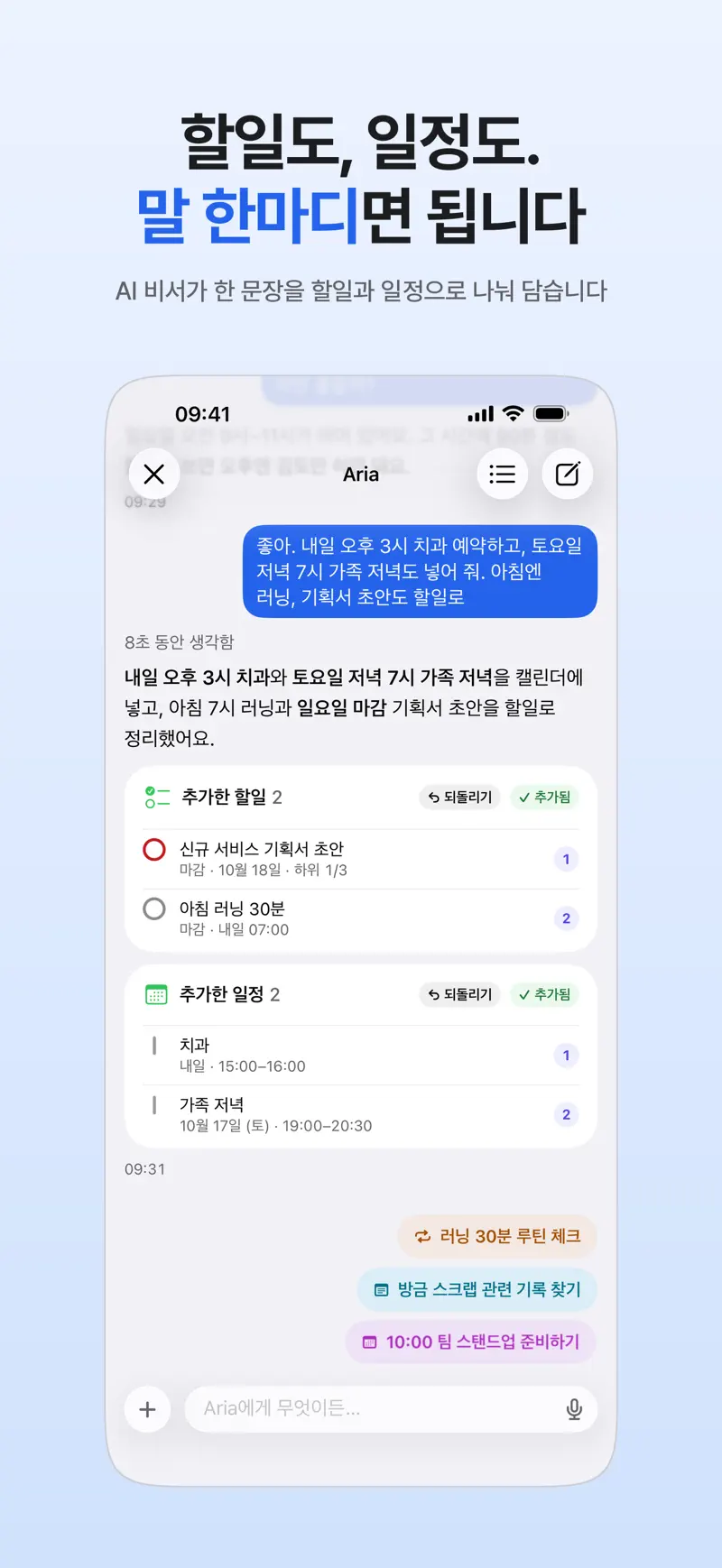
Features that do not use AI (creating tasks yourself, lists, calendar, widgets and more) are all free, and AI questions are free up to 20 a day, refilled daily.
How do I move my records when I switch apps?
Aria imports directly only from Apple Reminders. Go to Settings, General, Import and tap Import Apple Reminders; it only reads your Reminders, so the originals stay put (Import Apple Reminders into Aria). From other apps, paste just your active tasks into the chat and they are split into task suggestions. It is cleaner to leave finished history in the app you used before.
FAQ
Which free to-do list apps are there?
All six apps in this guide are free to download (Reminders is built into iPhone). Todoist, TickTick and Aria let you start free and add features with a subscription, and Microsoft To Do's App Store listing says it is free on all your devices (as of October 2026).
Do I need separate task and calendar apps?
If you have few tasks, separate apps are fine. If you want to place tasks that take time into open slots on a calendar, an app that shows both on one screen is easier. Aria shows tasks and events together in Day, 3-day, Week and Month views (Calendar and to-do app in one view).
How do I use it on both iPhone and a Windows PC?
Look at Microsoft To Do or TickTick, which have Windows apps, or Todoist or Google Tasks, which you can also use in a browser. Aria does not support Windows.
iPhone · iPad · Mac · Apple Watch · iOS 26.0 or later · English · Korean