How to Add Tasks and Events by Voice on iPhone
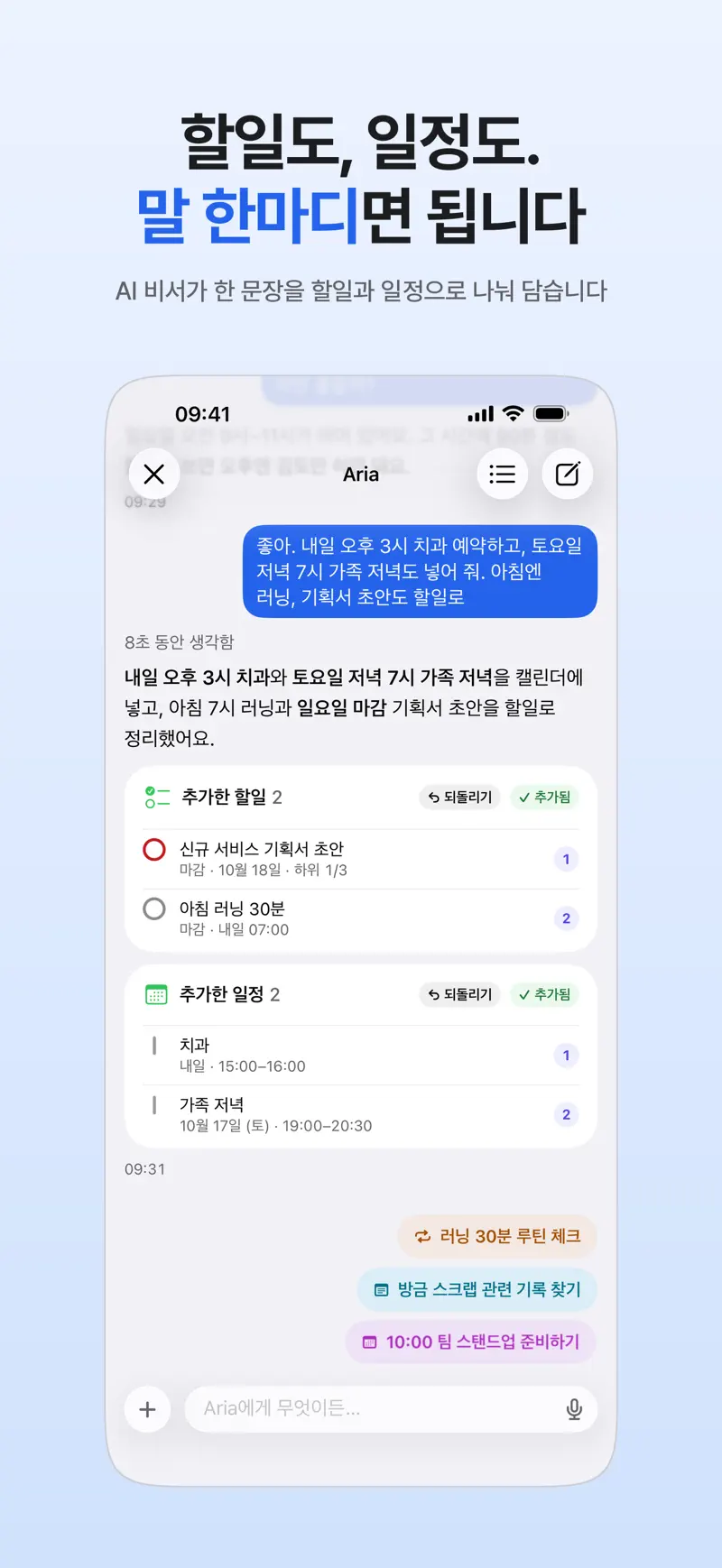
Key answer Open the Aria chat and say or type one sentence. The AI splits it into tasks and events. For example, “Report due Friday, team meeting tomorrow at 3 PM” becomes one task and one event. Results appear as cards you can check and undo right away.
- Open the chat Open Aria and tap the input field at the bottom. The first time, the AI consent screen explains what is sent where. Read it and agree to continue.
- Speak or type Tap the microphone button to talk, or type. You can mix tasks and events in one sentence.
- Check the result cards The tasks and events Aria added show up as cards. If something landed wrong, tap Undo on the card to cancel it.
- Add a long dictation in one go If you talk for a while, Aria turns it into suggested tasks. Tap Add All to save them at once.
- Add from other places too Siri and Shortcuts, Control Center and the Action button, and Home Screen or Lock Screen widgets can all send things to Aria quickly.
What you can say
- “Report due Friday, team meeting tomorrow at 3 PM” becomes one task and one event.
- “Set an alarm that really rings” creates a must-ring alarm that sounds even in silent mode.
- Send a photo or screenshot and say “add the dates from this” to use photo to schedule.
Up to 20 AI requests a day are free and refill every day. Entering tasks by hand (no AI) is free with no limit.
Get Aria on the App Store
iPhone · iPad · Mac · iOS 26.0 or later · English · Korean