ADHD To-Do List Tips: Set Up Your Phone to Remember and Start Tasks
Key answer When tasks slip through, four things can help: capture a thought the moment it appears, use loud alerts for a few must-do items, split big tasks so only the first step shows, and make time visible. Pick a to-do app by how easily it lets you set up these four.
Written by LIPSON, the maker of Aria. This is a guide to to-do app settings, not medical information. For questions about an ADHD diagnosis or treatment, please talk to a qualified professional.
Why do tasks keep slipping?
With or without a diagnosis, these struggles are common: a thought disappears if you cannot write it down right away, you dismiss a reminder because you are in the middle of something else, a big task leaves you unsure where to begin, your sense of time gets blurry, and once things pile up, even opening the list feels heavy.
This guide looks at easing those problems with app settings instead of willpower. What works differs from person to person, so try one change at a time for a week and keep only what helps.
Which setting helps with which difficulty?
| Difficulty | What can help | In Aria |
|---|---|---|
| I forget what I just thought of | One capture point that takes about 3 seconds | Tell the chat by voice · Control Center · Action Button · Lock Screen widget |
| I swipe reminders away | An alarm that sounds even on silent, plus staged alerts | The must-ring alarm · deadline alerts at several stages in a task's deadline and reminder settings |
| I cannot get started | Show only the first action | Break it down with AI in subtasks · Start Timer |
| My sense of time is blurry | Keep the remaining time in front of you | Lock Screen and Dynamic Island timer · Follow along on a routine |
| One missed day and I give up | Re-plan everything overdue in one go | Reschedule all in the evening wrap-up |
How can I capture a thought right away?
Sort things out later; for now pick just one place to capture and make it a habit. If your iPhone has an Action Button, put Aria there. If not, use Control Center or a Lock Screen widget so you never have to hunt for the app. Say one sentence such as “dentist tomorrow at 3, turn in the forms by Friday” and Aria splits it into an event and a task. If it filed something wrongly, tap Undo to cancel it. Step-by-step instructions are in How to add tasks and events by voice.
How do I stop missing alerts?
Use fewer alerts, but make the important ones loud. Set the must-ring alarm on a task and it rings like an alarm even in silent or Focus mode, and you can snooze it for 10 minutes from the Lock Screen. Tasks with deadlines get alerts as the deadline approaches, and for something you must leave the house for, the location alert On departure tells you when you step out. Setup is covered in iPhone to-do alerts that you will not miss.
How do I make starting easier?
A first step should take about two minutes. “Open the site to request the paperwork” is easier to begin than “prepare moving documents.” When Break it down with AI suggests steps, keep only the first one on today's list and tap Start Timer to get your hands on it. More ideas are collected in How to stop procrastinating.
How do I make time visible?
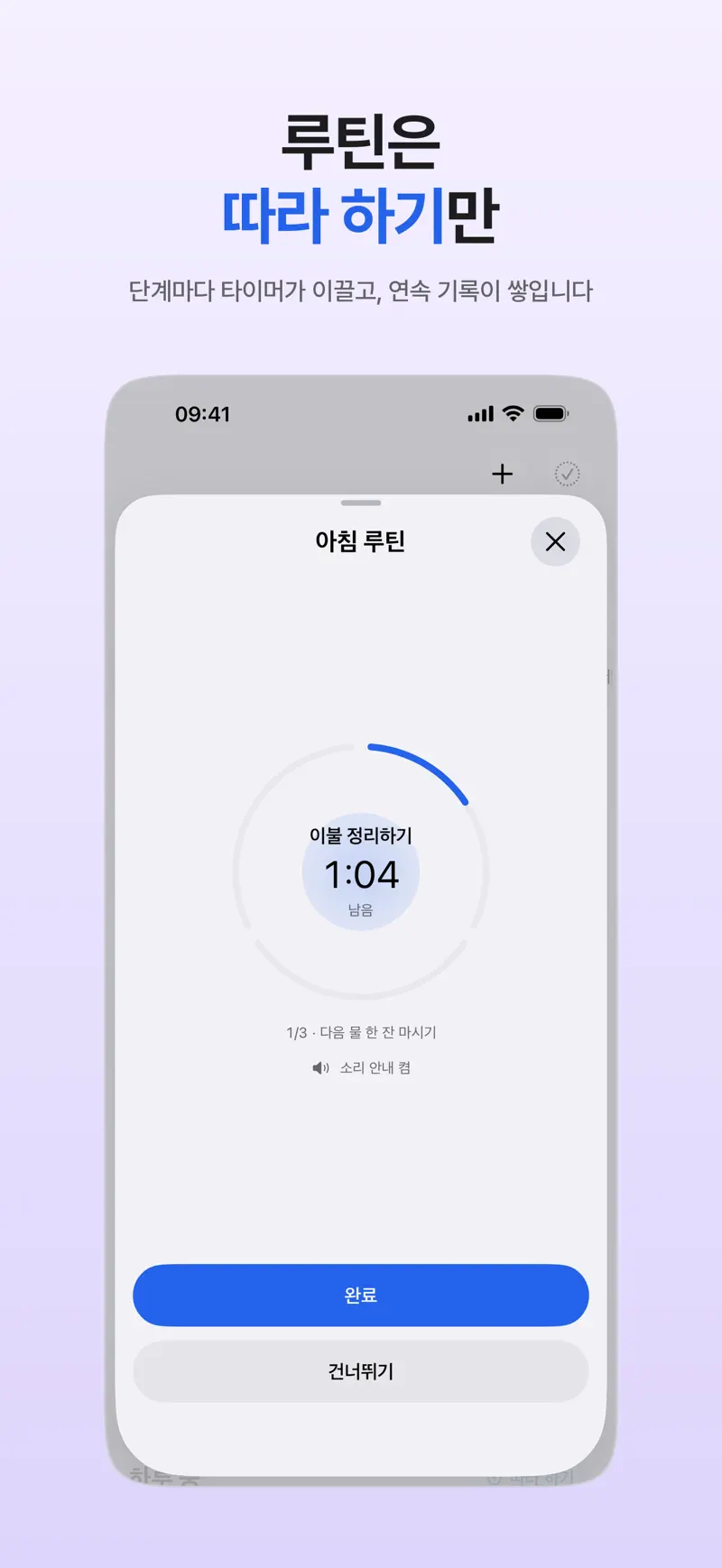
A timer started with Start Timer keeps its remaining time on the Lock Screen and in the Dynamic Island, so each time you glance at your phone you are reminded what you were doing. For multi-step things like mornings and evenings, build a routine and use Follow along to see the time left for each step (routine and habit app).
What should I look for in an app?
- Can you add a task in under 3 seconds? Look for a widget, button or voice entry.
- Can you make an alarm that sounds even on silent?
- Can you split a big task right inside the task?
- Does the remaining time show the moment you wake the screen?
- Can you move everything overdue in one step?
- Is the screen simple enough that you want to open it daily?
All of these are available in the released version of Aria, and the features that do not use AI are free. Still, an app is just a tool for daily life. If difficulties keep affecting your day, talk with a professional rather than trying to solve it alone.
FAQ
What is the best planner app for ADHD?
It depends on the person, so no single app fits everyone. Try each item on the checklist above (fast capture, strong alerts, task splitting, visible time, catching up on overdue tasks) for a week and keep what works for you.
Do too many notifications make me ignore them?
They can. Instead of putting an alert on every task, give a strong alarm to only the few that truly must happen, and check the rest in a morning briefing or on a widget.
Is an app enough?
An app is only a tool for remembering. It does not replace a diagnosis or treatment. If trouble with focus or daily routines keeps affecting your life, talk to a doctor or a mental health professional. Your local health authority or national health service website also has reliable general information.
iPhone · iPad · Mac · Apple Watch · iOS 26.0 or later · English · Korean