Kids’ Schedule Organizer: Never Miss School Notices, Permission Slips or Checkups
Key answer The most important thing is to move a kids’ event the moment you receive it. Share a photo of the paper notice or a screenshot of the school app with your to-do app to pull out the dates, set a reminder for the evening before for supplies, and add fixed-date items like checkups as countdowns. You will miss fewer things.
Why are kids’ schedules so easy to miss?
Because information comes in from too many places. Paper notices, a school communication app, the class group chat and clinic texts all arrive separately, and deadlines are short, like “bring this tomorrow.” Sometimes only one parent knows, and with more than one child, each school or program adds its own schedule.
How do you move items in from each source?
| Where it arrives | How to move it | Example reminder timing |
|---|---|---|
| Paper notice | Photograph it and share it to Aria → check the dates → Add All | One week before the event and the evening before |
| School communication app | Take a screenshot, share it → find dates | Supplies: the evening before at 8 p.m. |
| Class group chat announcement | Copy the message and paste it into the chat | The day before a sign-up deadline |
| Clinic or school text | Screenshot and share it, or say “Pediatrician appointment next Tuesday at 10” | The day before and when leaving |
How do you move dates from notices and school apps right away?
- Photograph it where you receive it Take a photo of the paper notice before it goes in the bag, and screenshot the school app as soon as you read it.
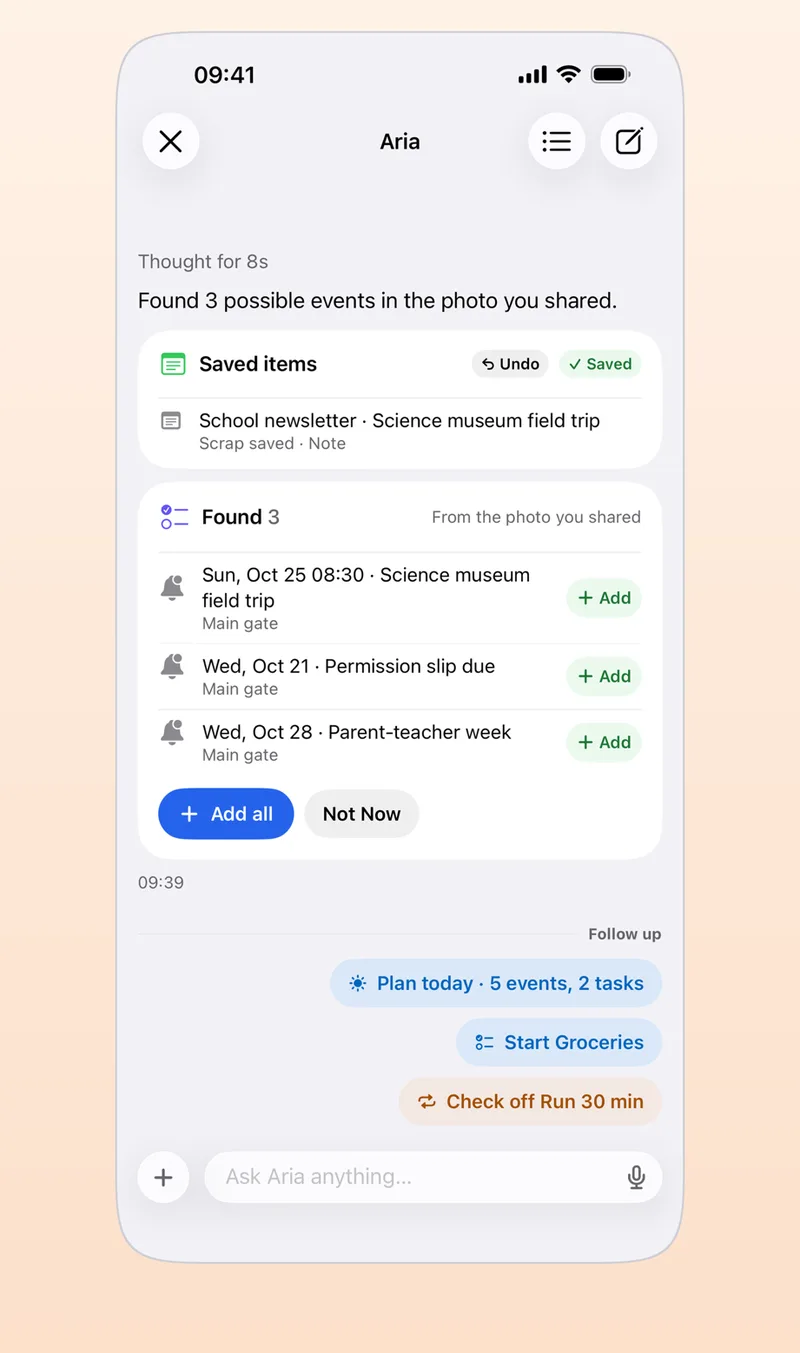
- Share it with Aria Tap Share in Photos and choose Aria, or attach it in the Aria chat.
- Check the dates it found Confirm the dates and times are right, then tap Add on just the ones you need, or Add All.
- Add supplies as subtasks Under a “field trip” task, add lunch, water and a hat as subtasks.
For example, take a made-up notice: “Fall field trip: depart October 30 at 9:30 a.m.; bring lunch, water and a hat; permission slip due October 24.” You would file the permission slip (due the 24th) as a task, the field trip as an event, and the supplies as subtasks.
The contents of a photo are sent to the AI provider you consented to, in order to find dates. You can also cover your child’s name or face before taking the photo if they have nothing to do with the date. Details are in adding events from photos, screenshots and PDFs.
When should you set supply reminders?
One the evening before you pack the bag and one in the morning before leaving is plenty. For things you must not forget, set a Must-ring alarm so it rings even in silent mode, and use the On departure location alert to be reminded as you leave home (iPhone to-do alarms).
For things you do in the same order every day, like getting ready for school, make a routine and use Follow along in the morning group. It walks you through getting dressed, brushing teeth and checking the bag one step at a time with a timer (routine and habit app).
How do you keep track of vaccinations and checkups?
Vaccine timing and types can differ by child and by country, so this guide does not cover them. Check your child’s vaccination record and the next due date with your pediatrician or your local health authority’s official immunization schedule, and follow their guidance. This guide is for organizing your calendar and is not medical advice.
Once you have confirmed a date, make it a countdown and put it in a Home Screen widget; add the clinic appointment as an event with a reminder the day before. For countdown widgets, see how to make a countdown widget on iPhone.
How do you see the schedule together with your partner?
Aria does not have a feature for sharing lists or calendars. Instead, use an iCloud shared calendar on your iPhone (the Family calendar from Family Sharing, or add people to a calendar). You both see the same events, and when you tap Connect Calendar in Aria they show next to your own tasks. A shared calendar you can edit can be chosen as the Default Calendar in Aria’s Settings, so events you ask the AI to make go onto it. The setup steps are in how to share an iPhone calendar.
Frequently asked questions
Can Aria track feedings and naps?
No. Aria does not have baby tracking such as feeding, sleep or diaper logs. Use a dedicated baby-tracking app for those, and use Aria for dated things like school events, supplies and appointments.
How can two parents see the same schedule?
Aria has no sharing feature of its own, so an iCloud shared calendar works well. For a list you both edit, such as groceries, you can use a shared list in Apple Reminders.
Can I build a getting-ready-for-school routine?
Yes. Make a routine with steps like getting dressed, brushing teeth and checking the bag, and set the estimated time for each. Follow along in the morning group then guides you one step at a time with a timer and sound.
iPhone · iPad · Mac · Apple Watch · iOS 26.0 or later · English · Korean