How to Use the Pomodoro Technique: 25 Minutes of Focus, 5 Minutes of Rest, on iPhone
Key answer The Pomodoro technique means choosing one task, working for 25 minutes, resting for 5, repeating, and taking a longer break after the fourth round. The iPhone Clock timer is enough, and a routine timer with preset step lengths saves you from resetting the time each round.
How does the Pomodoro technique work?
Francesco Cirillo began it in the late 1980s using a tomato-shaped kitchen timer, which gave it the Italian name for tomato, “pomodoro.” There are five steps.
- Pick one task Write it at a size you can make progress on in 25 minutes, such as “memorize 50 vocabulary words.”
- Start a 25-minute timer Work only on that task until it rings. Jot any stray thought on paper or in your task app and come back.
- Rest for 5 minutes Stand up, drink some water or stretch. It helps to step away from screens before the next session.
- Do four, then take a long break After the fourth session, rest for 15 to 30 minutes.
- Write down how many you finished Knowing how many sessions you did makes it easier to size tomorrow's tasks.
Can I change the 25 minutes?
Yes. 25 minutes is a starting point. Adjust the rhythm to the kind of work, but try one rhythm for a week before changing it.
| Rhythm | One round | Good for | Keep in mind |
|---|---|---|---|
| 25 / 5 | 30 minutes | Memorizing, clearing email, getting started | Deep work can feel interrupted |
| 50 / 10 | 1 hour | Writing papers, problem sets, coding | If you wander mid-session, it is easy to lose a lot of time |
| 90 / 20 | 1 hour 50 minutes | Planning and design work that needs deep immersion | Two or three a day is realistic |
How do I do it with the built-in iPhone apps?
- In the Clock app, go to Timer, set 25 minutes and tap Start.
- Under When Timer Ends, choose a sound so you do not miss the end.
- Use a Focus mode in Settings to cut notifications while you work.
- If your hands are busy, say “Hey Siri, set a timer for 25 minutes.”
How can I run it all at once with a routine timer?
Aria is not a dedicated Pomodoro app, so it has no focus-time statistics or auto-repeat. But you can chain step timers with Follow along on a routine.
- Create a routine with as many steps as you need and set the estimated time for each. For example: Focus 1 for 25 minutes, Break 1 for 5, Focus 2 for 25, Break 2 for 5. Two rounds (one hour) is easy to handle at first.
- Put the routine at one time of day. The Routine tab groups routines into morning, daytime, evening and anytime.
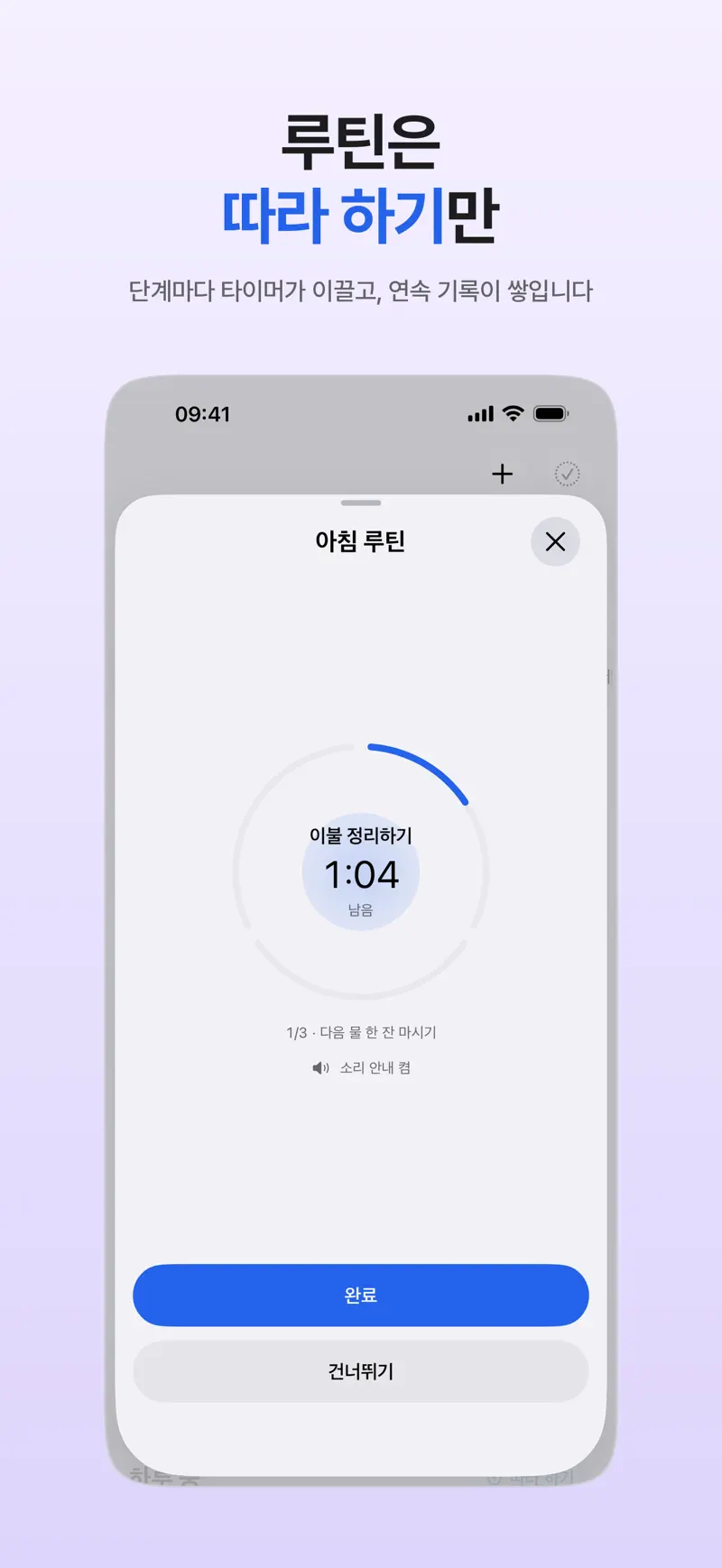
- Tap Follow along at the top of the group and a circular timer leads you through the steps one at a time, with the current step and time on the Lock Screen.
- It does not advance by itself when time runs out, so tap Done or Skip to move to the next step.
This suits people who study or work at the same time every day, and if your schedule changes daily, the Clock app timer is easier. To focus on a single task, tap Start Timer on a first task in the morning briefing and a timer for the current task appears on the Lock Screen and in the Dynamic Island. More on routines is in the routine and habit app guide.
How does it work for studying and for work?
For studying, decide an amount per round, such as “one chapter” or “20 problems,” and the number of finished rounds shows your progress. For work, long rhythms are hard to fit on meeting-heavy days, so try one or two 25-minute rounds in the gaps between meetings and check messages only during the 5-minute breaks. It pairs well with Time blocking method for laying out the whole day.
FAQ
How many sessions a day is right?
There is no fixed number. Start with a goal of four sessions (about two hours), write down how many you finish for a week, and then raise or lower it.
Can I check my phone during breaks?
You can, but five minutes slips away easily. Set a timer for your breaks too and start the next focus session as soon as it rings to keep the rhythm.
How is a Pomodoro app different from a study-time tracker?
A Pomodoro app focuses on pacing focus and rest. A study-time tracker focuses on logging how much time you actually studied each day. Pick the first if you need a rhythm and the second if you want to see pure study hours. Aria is neither; it connects tasks and routines with a timer.
iPhone · iPad · Mac · Apple Watch · iOS 26.0 or later · English · Korean