How to Prioritize Tasks When Everything Feels Important: 4 Criteria
Key answer If you cannot decide what comes first, write down three things for each task: its deadline, what happens if you skip it, and how long it takes. Then pick just one big task, three medium ones and five small ones for today (the 1-3-5 rule), and even a long list gets an order.
Why is it so hard to set priorities?
- Tasks are lumps — if you write “report” or “move house” as one big item, you cannot compare sizes.
- You use only one criterion — if you only look at urgency, everything looks urgent.
- The list is too long — looking at 30 items at once makes choosing tiring in itself.
So before ordering anything, break big tasks into a first action, use two or more criteria, and decide how many items you will look at today.
What criteria should you use to set the order?
- Deadline — when is it due? Who is waiting on it?
- Impact — what happens if you do not do it? Does doing it make other things easier?
- Effort — does it take minutes or hours?
- Energy — can you do it with the focus you have right now?
Score the first three from 1 to 3, and use energy to decide what time of day to do tasks that score the same.
| Task | Deadline | Impact | Effort | Total | Order |
|---|---|---|---|---|---|
| Reply to the client’s quote | 3 | 3 | 2 | 8 | 1 |
| Write the team’s weekly report | 2 | 3 | 2 | 7 | 2 |
| Sort expense receipts | 2 | 1 | 3 | 6 | 3 |
| Outline a new project idea | 1 | 3 | 1 | 5 | 4 |
| Clean up the inbox | 1 | 1 | 2 | 4 | 5 |
Even if a task scores low, one with an impact of 3 (the new idea) should not be dropped; block time for it on this week’s calendar. That is the “important but not urgent” kind of work.
How do the methods differ?
| Method | How it works | Good when |
|---|---|---|
| Eisenhower matrix | Sort tasks into four boxes by urgent and important | You have 20 or more tasks piled up and need a big cleanup |
| 1-3-5 rule | Pick 1 big, 3 medium and 5 small tasks a day | You are choosing today’s list every morning |
| ABCDE | Label tasks A (must do) to E (delete), then rank within A as A-1, A-2 | The list is long and the order is muddled |
| Eat the frog | Make the one task you dread but that matters your first job of the morning | You keep putting off the same thing |
| Impact and effort scoring | Start with high impact and low effort | You are choosing team work or improvement projects |
Splitting tasks into four boxes is covered with examples in the Eisenhower matrix guide. If you keep putting off the same task, see how to stop procrastinating too.
How many tasks should you pick for a day?
The 1-3-5 rule gives you nine a day. On a day full of meetings, scale down to 1-2-3. Keep only what you picked on today’s list and move the rest to other dates to get them out of sight.
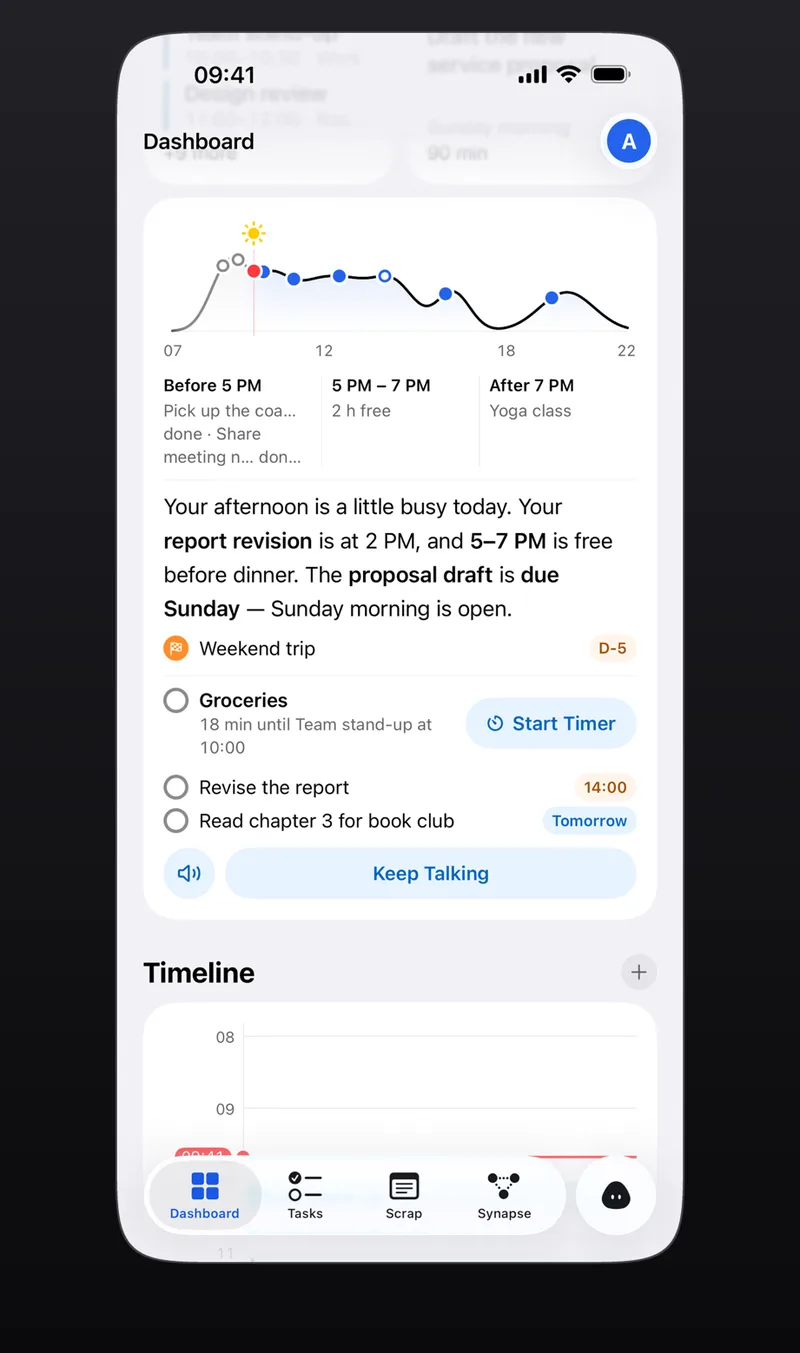
Aria’s morning briefing points out today’s events and what to do first in two or three sentences. Look at that list, pick one big task, and start it right away with Start Timer. If you split work and personal tasks into categories, comparing them gets easier too. More on the briefing in AI scheduling assistant.
What if something suddenly comes up?
- Score the new task on deadline, impact and effort within 10 seconds.
- Change the order only if it scores higher than the big task you picked for today.
- Move whatever gets pushed out to another day on the spot.
In the evening, use Aria’s Reschedule all to move everything left over at once, or Defer for one item at a time, so tomorrow morning’s list starts clean.
Frequently asked questions
What are the 4 criteria for setting priorities?
This guide uses deadline, impact (what happens if you skip it), effort (how long it takes) and energy (the focus you have now). Score the first three, and use energy to choose the time of day when scores tie.
How is this different from the Eisenhower matrix?
The Eisenhower matrix sorts tasks into four boxes to decide whether and when to do them: a big-picture sort. The scoring and the 1-3-5 rule here set the order within what you will do today. Use the matrix for the big cleanup and scoring for the daily order.
How do I align priorities in a team?
In a team, first decide who judges deadline and impact. Re-confirm the deadline with whoever asked, ask your lead about the order when tasks overlap, and keep a record. Aria is a personal to-do app, so it has no team sharing.
iPhone · iPad · Mac · Apple Watch · iOS 26.0 or later · English · Korean