Travel Checklist: What to Do From Two Weeks Out to Departure Day
Key answer Split trip prep by timing: bookings and documents two weeks out, packing three days out, a last check the morning you leave. Share flight and hotel confirmations as screenshots or PDFs so the dates become events, and set the things you must carry, like your passport, as an alert for when you leave home.
When do you do what to get ready for a trip?
| When | What to do |
|---|---|
| 2 weeks before | Check passport validity · collect flight and hotel confirmations · check entry documents and visa requirements · travel insurance |
| 1 week before | Currency exchange and a card that works abroad · data (SIM, eSIM or roaming) · organize the plan by day · arrange care for pets and plants |
| 3 days before | Start packing · basic medicines · chargers and a plug adapter · check the weather where you are going |
| The day before | Online check-in · charge your power bank · check the stove and windows |
| Departure day | Passport, wallet, phone · confirm your airport arrival time |
Entry requirements change by country and by time. Check your government’s official travel advisory site or the destination country’s embassy for the latest.
What do you pack for an international trip?
| Category | What to bring |
|---|---|
| Documents | Passport (also a copy or photo file), flight and hotel confirmations, travel insurance policy, an international driving permit if you will drive |
| Money and payment | A little local currency, a card that works abroad (two if you can), a local transit card |
| Electronics | Phone and charger, plug adapter, power bank (these usually must go in your carry-on — check your airline’s rules), earbuds |
| Daily needs | Clothes for the length of the trip, toiletries, basic medicines, a foldable bag, an umbrella |
In Aria, put the packing list under a “Trip packing” task as subtasks and check items off as you pack.
How do you turn booking confirmations into events?
- Save the confirmations Take a screenshot of the flight e-ticket and the hotel booking email, or save them as a PDF.
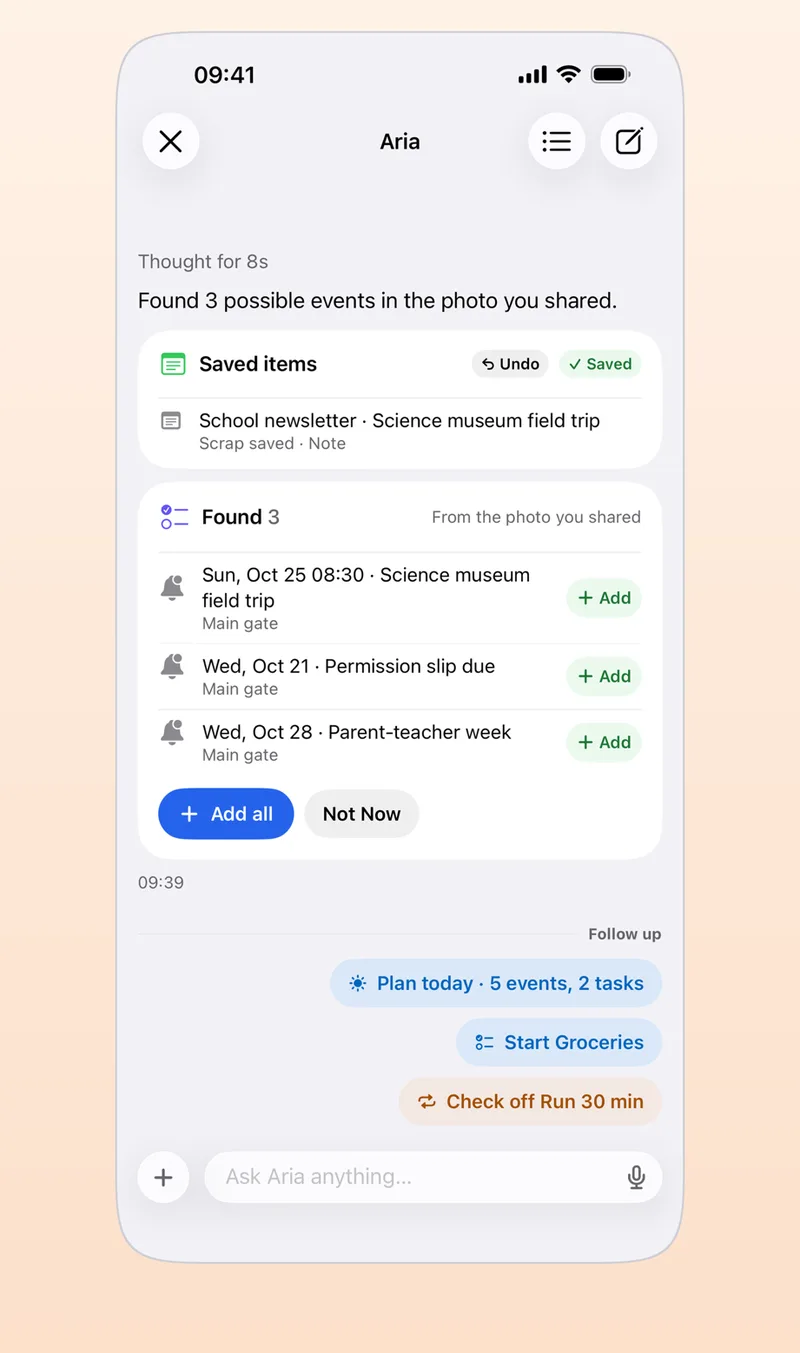
- Share them to Aria Choose Aria from the Share button and it finds the dates inside and shows them as event and task suggestions.
- Check the times and add them Check the departure and arrival times and the check-in and check-out dates, then tap Add All. If foreign times are mixed in, make sure they are local times.
- Set the departure date as a countdown Make your departure date a D-day and put it on a widget to see how close you are.
The contents of a confirmation are sent to the AI provider you consented to, in order to find dates. You can also cover details like a passport number before you take the screenshot (adding events from photos, screenshots and PDFs).
How do you get an alert when you leave home?
- Create a task called “Passport, wallet, phone.”
- Set home as the place for the task and choose On departure. The first time, it asks for location permission, so allow it.
- For a time you must keep, such as when to leave for the airport, set a Must-ring alarm. It rings even in silent mode.
Alert types and permissions are covered in iPhone to-do alarms.
How do you reuse the list on your next trip?
Write up the packing list from this trip and keep it as a note in an Aria scrap. Next trip, paste it into the chat and say “add this as packing for next month’s trip,” and it is split into task suggestions you can add in one go with Add All. For a trip you take every year at the same time, such as a holiday visit home, you can also set a repeating task.
Frequently asked questions
What is a good app for planning a trip itinerary?
Splitting jobs keeps them from overlapping: a map app for saved places, a calendar for the day-by-day schedule and a to-do app for packing. In Aria, you can move booking confirmation dates onto your calendar and use the day and 3-day views to see each day’s route like a timetable.
How can my family see the trip checklist too?
Aria has no list sharing. If the family needs to check things off together, use a shared list in Apple Reminders, and put the trip schedule in an iCloud shared calendar so it also shows next to your tasks in Aria.
How is a domestic trip list different from an international one?
A domestic trip needs mostly bookings and packing, while an international trip adds a passport, entry requirements, currency, data and plug adapters that you should finish two weeks out. So start checking two weeks ahead for international trips and three days ahead for domestic ones.
iPhone · iPad · Mac · Apple Watch · iOS 26.0 or later · English · Korean