GTD Method: Capture, Clarify, Organize, Review, Engage in a To-Do App
Key answer GTD means getting everything out of your head into one inbox, turning each item into a next action, sorting by date, place or project, and reviewing weekly. The point is not to rely on memory: build one list you can trust.
What is GTD?
GTD, short for Getting Things Done, is a work-organizing method introduced by David Allen. The idea is to hand the job of remembering to a list you trust, so your mind is free for what you are doing right now.
What does each of the 5 steps do?
- Capture Put everything that crosses your mind, every request and even paper notices in one place, without judging them.
- Clarify For each item ask, “Is there an action to take?” If so, write the next action in one line. If it takes two minutes or less, do it now.
- Organize Dated items go on the calendar, someday items on a separate list, and multi-step items become projects.
- Review Once a week, scan every list, clear what is done, and give stalled projects a next action again.
- Engage Pick the next action that fits where you are, the time you have and your energy.
How do you write a next action?
A next action starts with a verb and makes clear where and with what you will do it. Rewrite vague to-dos like this:
| Vague to-do | Next action |
|---|---|
| Move house | Text 3 moving companies for quotes |
| Car insurance | Check the renewal quote in the insurer’s app |
| Mom’s birthday | Ask my siblings in the group chat about a gift budget |
| Start a blog | Write down 5 candidate blog names |
| Report | Open last quarter’s report and copy its table of contents |
If you get stuck while sorting, decide in this order (the two-minute rule flow):
- Is there an action to take? If not, delete it or keep it as reference.
- If yes, will it take two minutes or less? Then do it now.
- If it takes longer, is it yours to do? If not, delegate it and mark it Waiting For.
- If it is yours, does it have a set date? Put it on the calendar if so; otherwise add it to your next actions list.
How do you do a weekly review?
Thirty minutes a week is enough. Check these five things in order.
- Empty your inbox: finish clarifying everything left.
- Look back through last week’s calendar and write down any follow-ups you missed.
- Look ahead through the next two weeks of your calendar and write down what needs preparing.
- Check that every project has one next action.
- Pick what to promote from your Someday list to this week.
To combine this with weekly planning, see how to plan your week.
How do you do GTD in a to-do app?
| GTD step | What a to-do app needs | In Aria |
|---|---|---|
| Capture | One fast place to put things | Inbox · talking to the chat · sharing from other apps · widgets and Control Center |
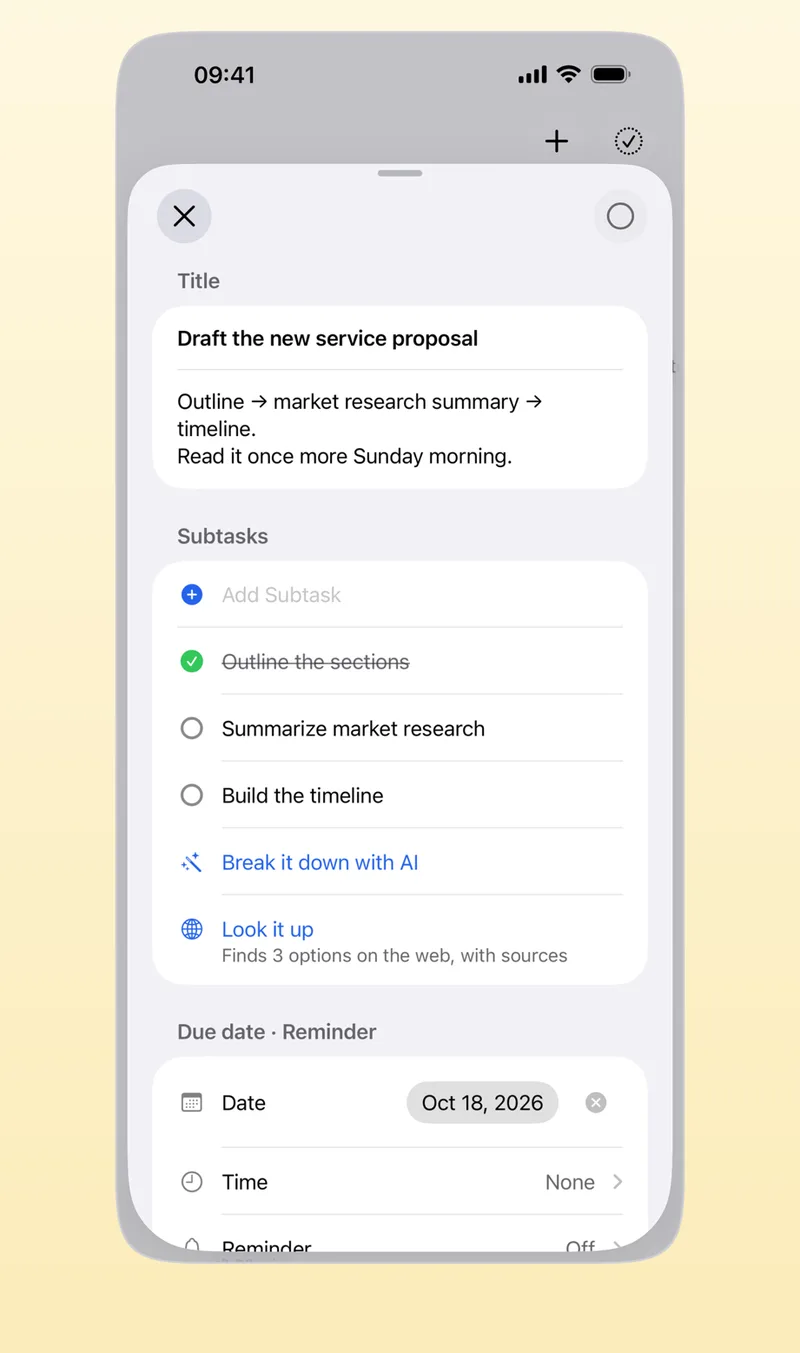
| Clarify | Break tasks into actions | Subtasks · Break it down with AI |
| Organize | Lists by date or context, plus a calendar | Today, Upcoming and Someday lists · categories · calendar timetable |
| Review | A screen you scan regularly | Evening wrap-up · weekly briefing |
| Engage | Focus on what is next | Start Timer on the first task |
Aria’s Inbox is where tasks you have not sorted yet collect, so it works as the GTD inbox as it is. Tasks with no date gather in Someday, which plays the role of a Someday/Maybe list. For adding by voice, see adding tasks by voice; for paper notices, see adding events from photos.
Do you have to do it perfectly from day one?
No. In week one, just capture and clarify; in week two, add one weekly review. Context lists such as “phone calls” or “at the computer” can wait until you need them. Do decide up front on one place for to-dos. When they are scattered across several apps and notes, you stop trusting the list.
Frequently asked questions
What is the two-minute rule?
When you meet something that takes two minutes or less while sorting, do it on the spot instead of writing it down. Writing it down and finding it again takes longer than doing it.
Can I combine GTD with the Eisenhower matrix?
Yes. Use GTD to collect everything and turn it into next actions, then use the four urgent/important boxes when you choose what to do first today. See the Eisenhower matrix guide for how to split the four boxes.
Which app suits GTD?
Look for three things: a fast single place to capture (capture), a way to break tasks down (clarify), and undated lists alongside a calendar (organize). A paper notebook plus a calendar works too.
iPhone · iPad · Mac · Apple Watch · iOS 26.0 or later · English · Korean